A guide to AI hardware requirements covering GPUs, TPUs, CPUs, memory, & storage for training and inference, with an on-prem checklist for regulated industries.
Training large language models uses frontier graphics processing units, while AI inference runs on lighter, cheaper AI accelerator chips.
Blackwell, TPU 8t/8i, and AMD MI300X reset 2026 price-performance for AI workloads.
Above 20% utilization, owned AI hardware beats cloud services in ~4 months.
Financial services default: cloud AI training, on-prem, or audited-colo inference.
High bandwidth memory (HBM) and video RAM usually limit which AI models can run.
Get 1% smarter about AI in financial services every week.
Receive weekly micro lessons on agentic AI, our company updates, and tips from our team right in your inbox. Unsubscribe anytime.
Thank you! Your submission has been received!
Oops! Something went wrong while submitting the form.
AI hardware requirements have moved faster in the past 18 months than in the prior decade. Modern AI hardware now ranges from a single laptop running quantized 7B-parameter models for local AI development to 9,600-chip TPU superpods serving trillion-parameter inference for the world's largest AI applications. AI technology has crossed the line from research project to load-bearing enterprise infrastructure, and the AI hardware components beneath it are evolving just as quickly.
This 2026 guide breaks down the hardware for AI you actually need across AI training and AI inference, the new silicon that resets price-performance (NVIDIA Blackwell, Google TPU 8t/8i, AMD MI300X), and the on-prem pattern banks, credit unions, insurers, and PE firms use to keep regulated AI workloads inside their audit perimeter. Whether you are sizing infrastructure for a single inference node or planning larger-scale AI operations, the right AI hardware components will dictate your AI performance, energy consumption, and total cost of ownership.
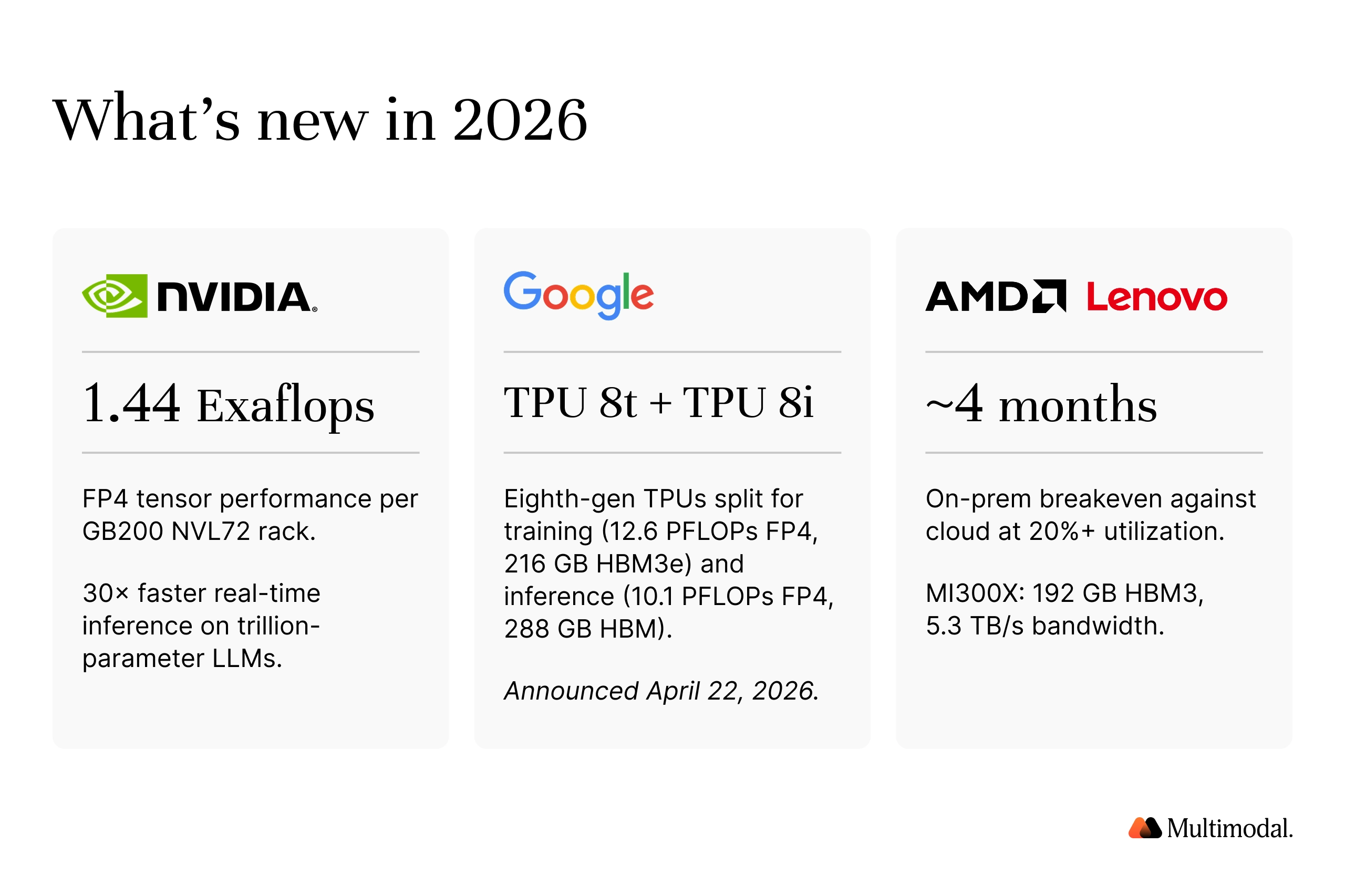
NVIDIA Blackwell GB200 NVL72 delivers 1.44 exaflops of FP4 tensor performance per rack and up to 30x faster real-time processing on trillion-parameter large language models. It is one of the year's headline breakthrough technologies for high-performance AI workloads.
Google's TPU 8t and 8i (April 22, 2026): TPU 8t (training) delivers 12.6 FP4 PFLOPs and 216 GB HBM3e per chip, scaling to 121 exaflops per superpod. TPU 8i (inference) delivers 10.1 FP4 PFLOPs, 288 GB HBM, and 80% better price-performance than Ironwood, making it among the best AI hardware Google has shipped for low-latency AI applications.
AMD MI300X ships with 192 GB of HBM3 memory and 5.3 TB/s of memory bandwidth, enabling complex models with hundreds of billions of parameters to fit on a single device. For sustained inference above 20% utilization, on-prem now breaks even against cloud in ~4 months, down from 12–18 months. That is a turning point in the economics of running AI models at scale.
What hardware is needed for AI?
AI hardware refers to specialized components designed to execute AI algorithms and deep learning models, providing parallel processing and high-bandwidth memory access that traditional computers and general-purpose hardware cannot deliver. Where ordinary computer hardware spreads work serially across a handful of CPU cores, modern AI hardware fans the same matrix math across thousands of processing units in parallel. That is the basis of GPU acceleration, which has powered the past decade of AI development and now defines modern computing.
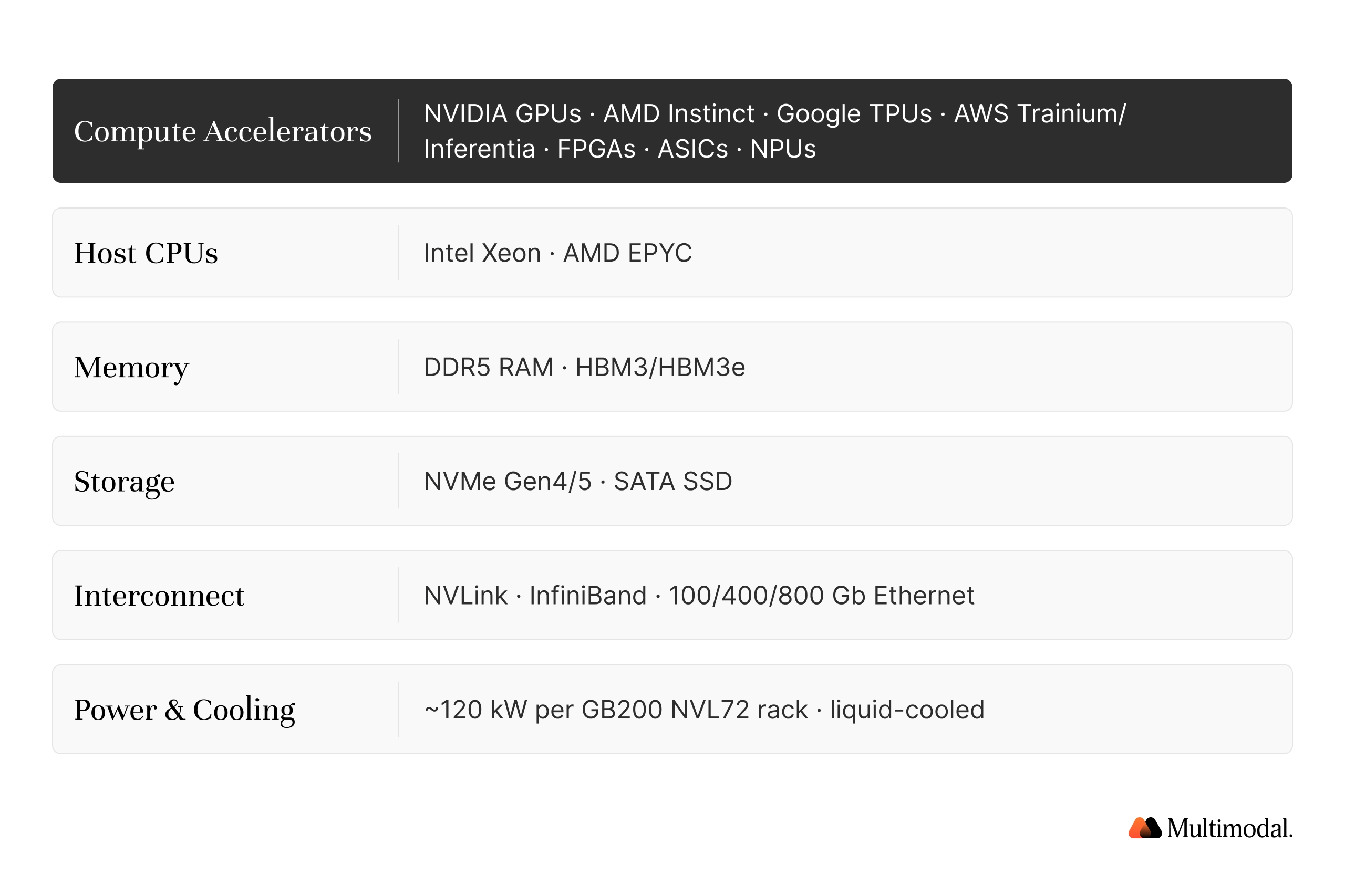
A modern AI hardware stack has six layers:
Compute accelerators: NVIDIA GPUs (H100, B200, NVIDIA RTX 5090), AMD Instinct, Google Tensor Processing Unit (TPU) silicon, AWS Trainium/Inferentia, field-programmable gate arrays (FPGAs), application-specific integrated circuits (ASICs), and neural processing units such as Apple's Neural Engine.
Host CPUs: Intel Xeon or AMD EPYC server CPUs that coordinate AI operations and feed the accelerators with data.
Memory: Random Access Memory (RAM) for the host plus high bandwidth memory (HBM) on the AI accelerator itself. Memory capacity often limits which AI models you can run, and high-bandwidth memory HBM is the most expensive component on most boards.
Storage: NVMe and SATA SSDs to retain data, serve training datasets, and stream model checkpoints. AI training workloads are read-heavy; AI inference workloads are mostly write-light.
Interconnect: NVLink inside the node, InfiniBand or 400/800 Gb Ethernet across nodes. The choice often determines whether scaling is linear or sublinear in large-scale AI operations.
Power and cooling: A GB200 NVL72 rack draws ~120 kW fully liquid-cooled, so energy consumption and energy efficiency gate many builds.
The right AI hardware solutions for your AI systems depend on whether you are training, fine-tuning, or running AI models in production. Most teams blend cloud services for bursty AI training with specialized hardware for sustained AI inference, the hardware solutions that complete AI tasks predictably, day after day.
AI Hardware: Training vs Inference
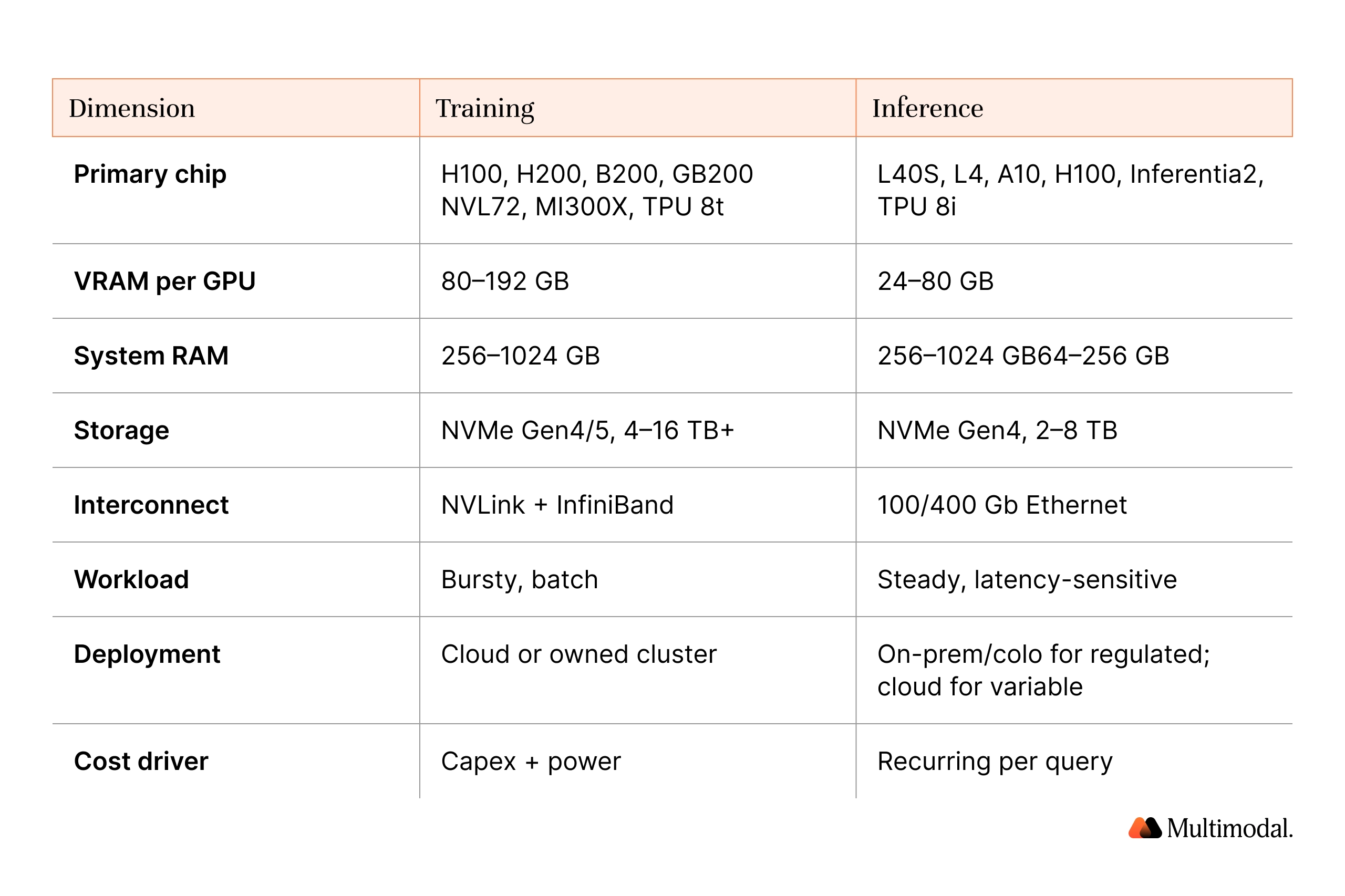
Training saturates thousands of GPUs for weeks, and the demand for computational power is constant. Inference is the long tail: steady, latency-sensitive requests over years. NVIDIA and Google now ship distinct training and inference silicon precisely because the two phases of AI computation have different hardware requirements, different memory profiles, and different cost curves.
What hardware do you need to train AI?
Training shortlist: NVIDIA H100/H200 (80–141 GB HBM), Blackwell B200 and GB200 NVL72 (1.44 exaflops FP4 per rack), AMD MI300X (192 GB HBM3, 5.3 TB/s, 1,307 TFLOPS FP16), Google TPU 8t (12.6 FP4 PFLOPs, 121-exaflop superpod). Tensor cores on NVIDIA GPUs, CDNA matrix units on AMD, and TPU MXUs on Google silicon accelerate the dense matrix math at the core of deep learning algorithms and neural network training.
Round out the node with Xeon or EPYC CPUs, 256–512 GB of system random access memory for 70B fine-tuning (1 TB+ for pretraining), 4–16 TB of local NVMe Gen4/5 data storage, and parallel file systems. NVLink inside the node and InfiniBand NDR or 400/800 Gb Ethernet across nodes usually cap throughput at scale.
For large-scale AI operations like frontier pretraining, every layer of the AI hardware stack must be tuned to keep the accelerators saturated. Idle GPUs are the most expensive thing in any AI training run, and high performance is wasted if the interconnect cannot feed them.
What hardware do you need for AI inference?
Inference shortlist: NVIDIA L40S, L4, A10 for small and mid-sized AI models; H100 or H200 for large language models above 70B; AMD MI300X for 405B at FP8 on a single device; AWS Inferentia2 for AWS-only deployments; Google TPU 8i (288 GB HBM, 384 MB on-chip SRAM, 80% better price-performance than Ironwood).
For local AI and developer rigs, NVIDIA RTX 4090 or 5090 with 24–32 GB of video RAM runs quantized 7B–13B models, and the same cards double as workstation GPUs for rendering graphics and computer vision experiments. Mobile devices increasingly use Apple's Neural Engine and similar neural processing units for on-device AI tasks, from real-time processing of camera computer vision to voice and machine learning models embedded in apps.
CPU-only inference works for less memory-hungry models and small or quantized models on Xeon/EPYC with BF16/FP8, a useful fallback for AI applications where latency is not critical. Field-programmable gate arrays and application-specific integrated circuits (e.g., Inferentia2, TPU 8i, Cerebras, Groq) serve specialized domains where general-purpose hardware cannot deliver optimal performance.
AI Hardware Requirements for Regulated Industries
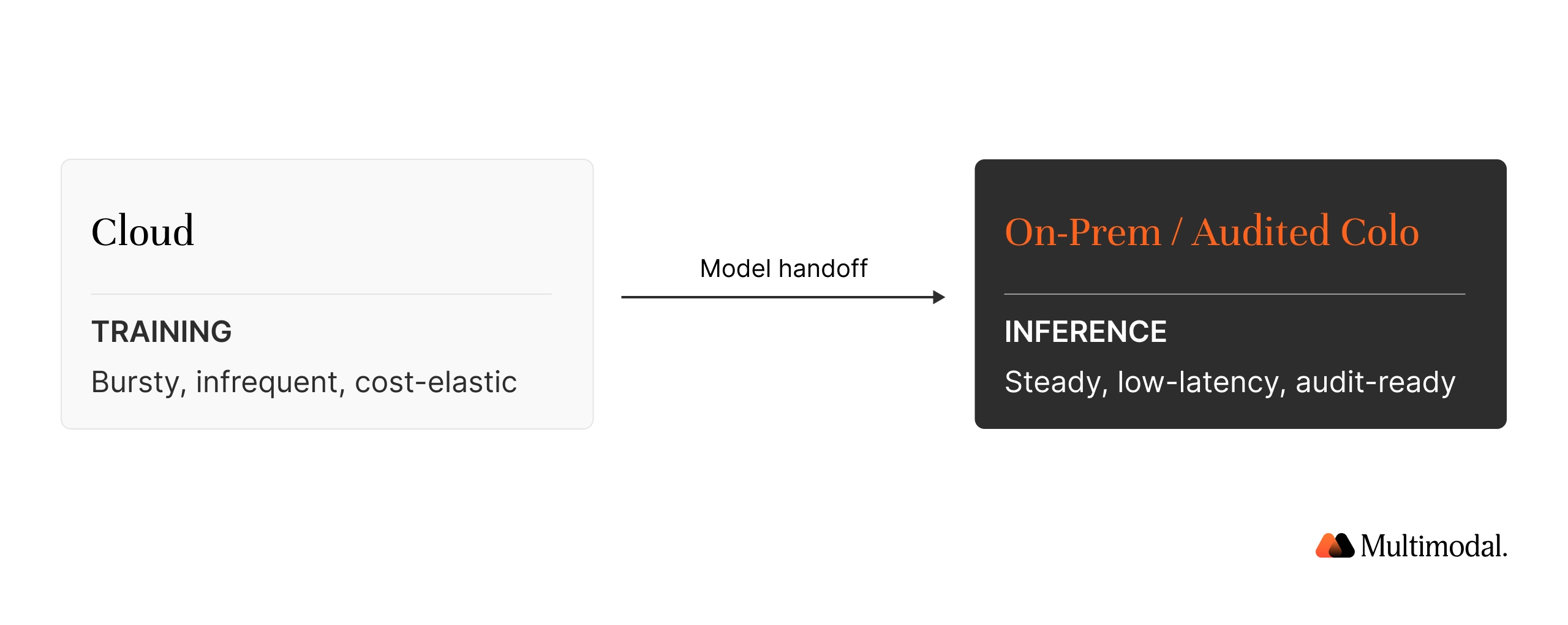
Banks, credit unions, insurers, and PE firms operate under PCI DSS, GLBA, SOX, GDPR, FFIEC, and EU AI Act obligations that require provable control over where regulated data is processed and how AI operations can be audited. The pattern most converge on is hybrid: AI training in the cloud (bursty), AI inference on-premises or in audited colocation (steady, tied to regulated data).
Deutsche Bank's partnership with NVIDIA runs GPU-accelerated risk valuation, price discovery, and model backtesting in real time across on-prem and Google Cloud. It is a reference architecture for high-performance computing inside a regulated perimeter. For credit unions and community banks, a single inference server with two L40S GPUs or a single MI300X is sufficient to run a fine-tuned 70B assistant for loan origination, claims triage, or member service. The reason for keeping it on-prem is data residency and audit readiness.
The AI systems process data that cannot leave the institution, and sustained performance across audit cycles matters more than peak throughput. See Multimodal's security posture and how Forum Credit Union automated SBA loan processing.
Where to get hardware for AI, and is it expensive?
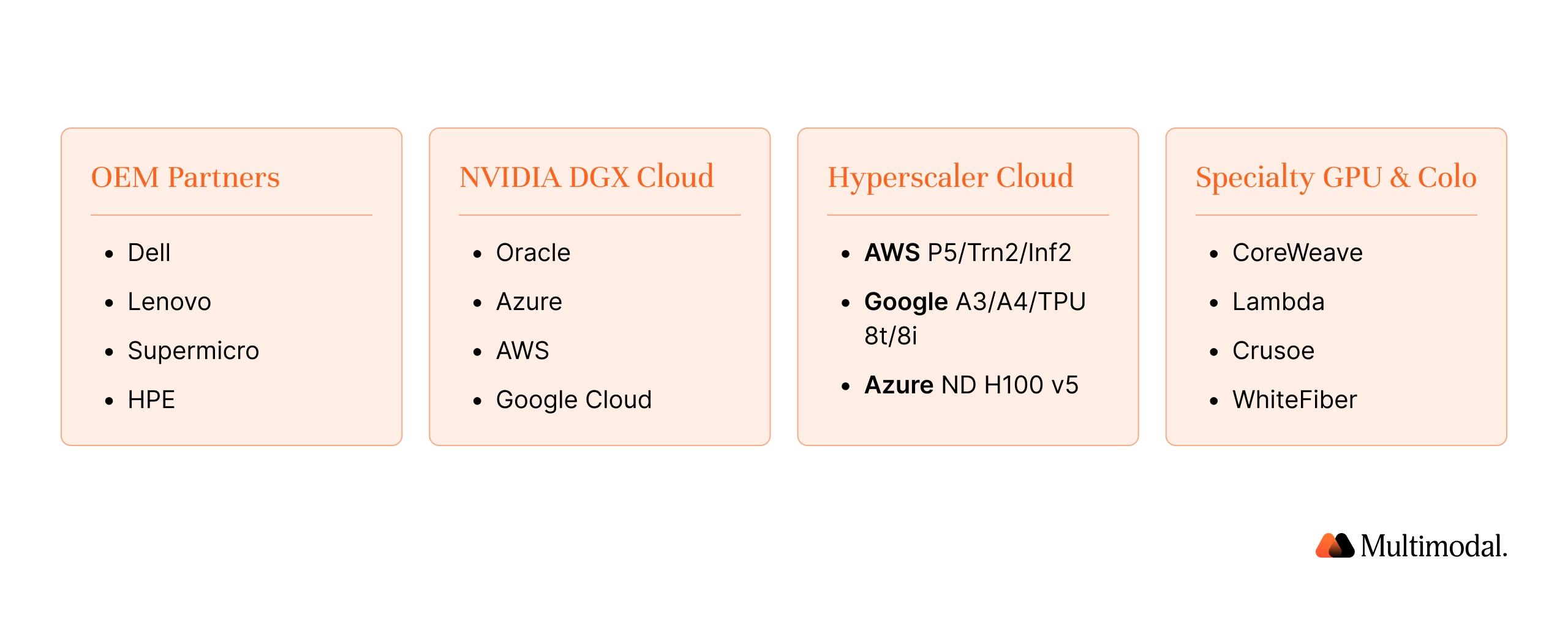
Four buying motions cover most AI hardware purchases: NVIDIA OEM partners (Dell, Lenovo, Supermicro, HPE); NVIDIA DGX Cloud via Oracle, Azure, AWS, Google; hyperscaler cloud services (AWS P5/Trn2/Inf2, Google A3/A4/TPU 8t/8i, Azure ND H100 v5); and specialty GPU clouds or colocation (CoreWeave, Lambda, Crusoe, WhiteFiber).
Lenovo's 2026 TCO analysis finds sustained AI inference above 20% utilization breaks even on-prem in ~4 months, with up to 8x cost advantage per million tokens versus cloud IaaS. Bursty workloads remain cheaper in the cloud, because the math turns on utilization, not on whether on-prem is "better" AI hardware in the abstract.
Yes, artificial intelligence is expensive to run at scale. The dominant cost drivers are compute (GPU/TPU time), energy consumption, and the staff to operate the stack. Energy efficiency improvements in next-generation AI hardware (Blackwell vs Hopper, TPU 8i vs Ironwood) are what make today's AI applications economically viable; without those gains, AI inference for large language models at consumer scale would still be a research curiosity rather than the backbone of modern AI processing.
Frequently Asked Questions
Does AI run on GPU or CPU?
Both. Small or quantized inference runs on Intel Xeon or AMD EPYC CPUs. AI training and large-model inference use graphics processing units (GPUs), tensor processing units (TPUs), or specialized AI accelerator chips. Most production AI systems combine a CPU host with one or more accelerators to balance flexibility, AI performance, and cost across different AI workloads.
Which GPU is best for AI in 2026?
For frontier AI training, NVIDIA Blackwell B200 and GB200 NVL72 lead, with AMD MI300X as a cost-sensitive alternative. For AI inference, NVIDIA L40S, L4, A10, and H100 cover most enterprise AI workloads; AWS Inferentia2 and Google TPU 8i offer lower per-token pricing on cloud services. The "best AI hardware" choice depends on workload shape, model size, and where your data has to live.
How many GPUs do I need for AI?
Fine-tuning 7B–13B AI models: one high-memory GPU (RTX 4090, 5090, L40S, A10). 70B models: 2–8 GPUs per node. Frontier large language model pretraining: hundreds to tens of thousands. AI inference scales with peak requests per second, not with total model parameters, which is a useful rule when sizing for AI processing under real-world load.
What's the difference between GPU and TPU?
GPUs are general-purpose hardware accelerators originally built for graphics rendering and now widely used for parallel processing in scientific computing and AI. The tensor processing unit (TPU) is an application-specific integrated circuit that Google designed for tensor math at the core of machine learning. In 2026, Google split TPU into TPU 8t (training) and TPU 8i (inference); NVIDIA GPUs continue to handle both, with tensor cores accelerating the same operations.
Can I run AI inference on CPU only?
Yes, for small or quantized AI models. Modern Intel Xeon or AMD EPYC servers with BF16 or FP8 instructions serve 7B-parameter machine learning models, embeddings, and many computer vision AI tasks at acceptable latency. Throughput is lower than on a GPU, but for AI applications with modest traffic and lower memory pressure, CPU-only is a viable deployment option.
Do I need on-prem hardware, or can I use the cloud?
Above 20% sustained utilization, or when regulation requires provable data residency, owning AI hardware breaks even in ~4 months. Bursty AI workloads are cheaper in the cloud. Financial services default: hybrid, with cloud AI training and on-prem AI inference for regulated AI applications.
How much VRAM do I need to run a 70B-parameter model?
Roughly 24–48 GB of video RAM for a quantized (INT4/INT8) 70B model, 80 GB+ for full FP16. For 405B-parameter complex models, plan on 192 GB+ of high-bandwidth memory on a single device (such as the AMD MI300X) or multi-GPU setups using NVLink/NVSwitch. Video RAM and HBM are the most common bottlenecks when running AI models locally.
What hardware do banks and credit unions need for AI?
For document understanding, fraud detection, and member-facing assistants, one inference node with two NVIDIA L40S GPUs or one AMD MI300X covers most credit unions. Larger banks running risk analytics use multi-node H100/H200 clusters on-prem or in audited colocation to meet PCI DSS, GLBA, FFIEC, and SR 11-7 obligations, with a high-performance computing footprint sized to their AI processing and computational needs.
Is it cheaper to own GPUs or rent them?
For sustained AI inference at 20% utilization or higher, owning is cheaper: Lenovo's 2026 TCO puts the on-prem breakeven at ~4 months, with an 8x cost advantage per million tokens versus cloud IaaS. For bursty AI training, renting through cloud services is cheaper. The decision turns on workload shape, not on AI hardware preference.
What's the minimum hardware to test an LLM locally?
A consumer NVIDIA RTX 4090 or 5090 with 24–32 GB of video RAM, or an Apple Silicon Mac with 64 GB+ of unified memory, runs quantized 7B–13B AI models for local AI development. For 30B–70B models, plan on two GPUs or 96 GB+ of unified memory to keep all model parameters resident in fast memory and avoid swapping that would tank AI performance.
Build AI Your Industry Can Trust
Deploy custom multimodal agents that automate decisions, interpret documents, and reduce operational waste.
Multimodal builds AgentFlow, an agentic AI platform purpose-built for financial services, on the modern AI hardware stack above. It deploys as SaaS, in your VPC, or fully on-premises, so AI inference for sensitive workflows stays inside your audit perimeter. AgentFlow uses GPU acceleration where it makes sense and CPU-class hardware where it doesn't, a pragmatic mix that keeps AI computation costs in check while delivering sustained performance on regulated AI workloads.
For background, see our pillars on AI infrastructure, SaaS vs self-managed AI infrastructure, and LLM fine-tuning. See AgentFlow's reference architecture in action: book a demo to match the deployment shape to your hardware footprint and compliance scope.

.svg)
.svg)

.avif)
.png)

.png)